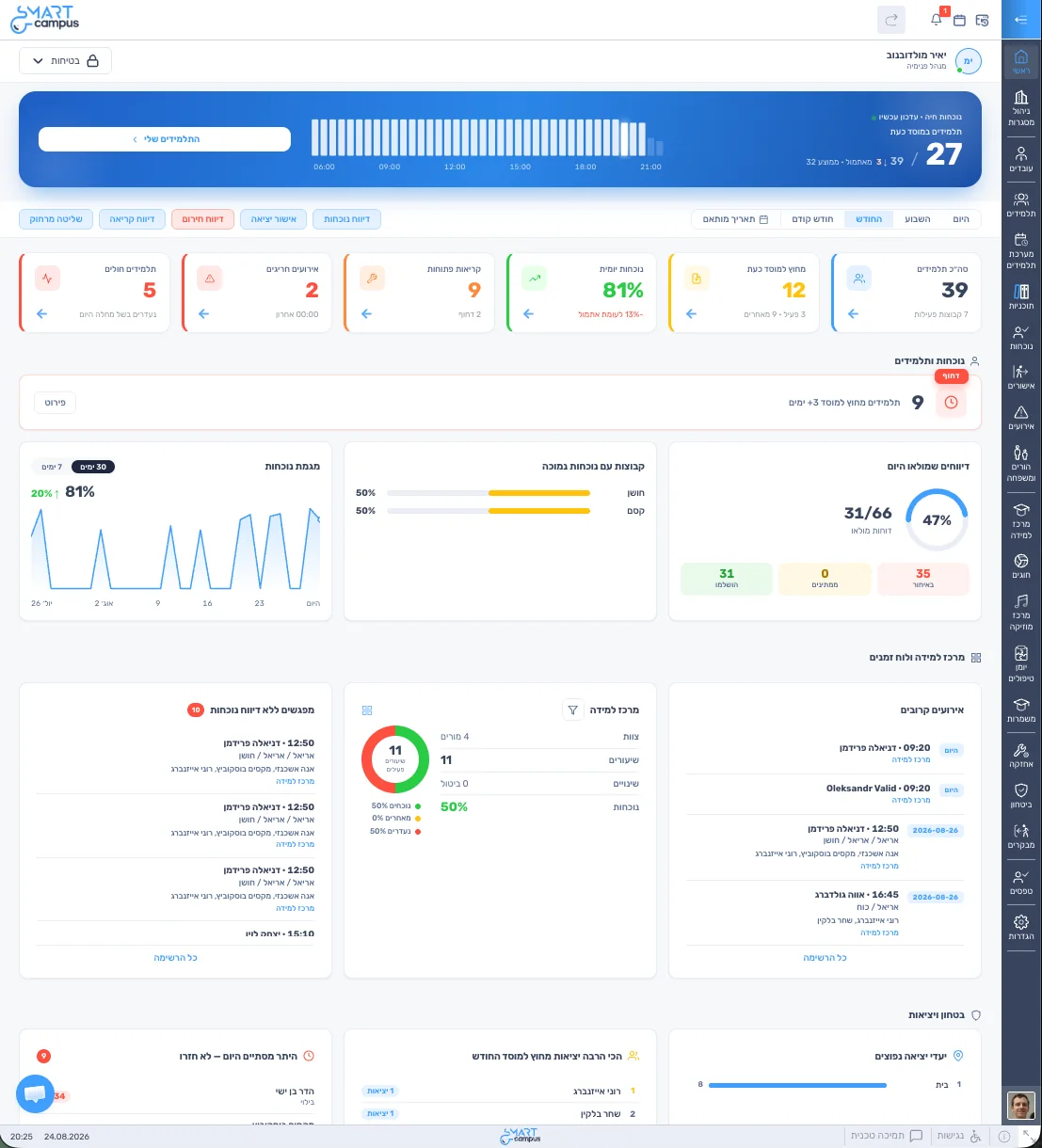
Main management dashboard
The whole institution at a glance, in real time. See what needs attention and what has changed.
- Daily attendance, sick students and open incidents
- Learning center: lessons held or cancelled
- Students who have not been checked in on lately
- Low-attendance groups and trends
Digital student file
Brings the student’s information together and shows changes over time, so staff can review them and decide.
- A dashboard summarizing the student’s information
- Trends in attendance, incidents and conversations over time
- Flags changes worth a closer look
Personal plan
A plan for every student with goals, tasks and progress tracking, for personal attention and growth.
- Goals by period and tasks with due dates
- Tasks the student completes, plus a chat with them
- Plan team, notes and documents
- Progress as a percentage and overdue tasks
Attendance & live status
A quick report from the phone, no lists to collect. Management sees who is present and who is missing.
- Reporting by group, activity, bus or trip
- Absences, late arrivals and reasons
- Attendance history per student
- Linked to exit and return approvals
How it works, step by step Group management
Permanent and temporary groups, drag-and-drop placement and room and bed management in one place.
- Group dashboard with the full picture
- Temporary groups in a click: weekend stays, teams, trips
- Drag students between groups
- Room and bed allocation
Learning center & clubs
Less coordination around lessons, and a clear picture of learning.
- Timetables for teachers and students
- Registration, placement and waitlists
- Attendance for every lesson
- Teacher-hour approval for payroll
How it works, step by step Parents & family
Parents send requests from their phone, and the counselor approves them in one tap.
- Exit requests from parents: destination, times and escort
- Approve or decline with a note to the parent
- Tracking: approved, declined and pending
- Direct WhatsApp and phone contact
How it works, step by step Exit & entry approvals
Exit requests, parent approvals and gate updates in one process.
- Mobile approvals with instant gate update
- Exit requests and parent approvals in one place
- Alert when a student is not back on time
How it works, step by step Forms & documentation
Document once, and it is saved in the student file.
- Structured forms for one-on-ones, case reviews and incidents
- Saved directly to the student file
- Access by role and permission
- Action log and follow-up
Care journal
Care team records in a protected space, with defined view permissions.
- Records of care sessions and meetings
- Role-based access, only for those who need it
- Linked to the student file and personal plan
Maintenance & service calls
Report an issue from the phone and it reaches the right person.
- Reporting by building, room and location
- Automatic assignment by category
- Urgency, status and handling times
- Tracking through to closure
Security & guard screen
A work screen for the security team: who may leave, who entered and who is on campus.
- A dedicated screen for security staff
- Quick search and approval status check
- Three verification levels: tablet, dynamic QR, face recognition
- Log of movements and visitors